
Ranking in Tier-2 Hubs: Multi-Pin Schema Architecture

Everyone fights for Delhi and Mumbai. Almost nobody fights for Ballia, Azamgarh, Mau or Deoria — and that is where the opportunity is. In a tier-2 hub, the business that shows up properly on Google is often the only one that does. A business owner in Gorakhpur searching for a website developer is ready to hire. In a smaller city, the business that arrives with a real page, a verified profile and clear services does not have to outspend anyone — it just has to show up.
This article explains how we built MetaPrime's own presence across 20 Indian city hubs, and the system behind it. No ranking position is claimed here — Google decides ranking, and no honest article can promise one. What we can show is the work: what a real hub page needs, the checklist we follow, and a full working schema example.
Why one thin page per city fails
The shortcut version of local SEO is tempting because it is fast. Write one page, copy it twenty times, swap the city name in each copy, and publish — twenty pages in an afternoon. The problem is that Google has seen this trick for years, and its spam policies name it: near-duplicate pages where only the location changes are thin content, and thin content does not rank. A page that says nothing about Ballia except the word Ballia gives a Ballia business owner no reason to call. It is a placeholder wearing a city's name, and placeholders do not win enquiries.
A real hub page is slower to build and the only version that lasts. Each of our 20 hub pages is written for its city. A page for Ballia talks about Ballia; a page for Varanasi talks about Varanasi. They share a structure, never their content. That is the whole game: the structure keeps the site consistent, and the unique content is what makes each page worth indexing.
What a real hub page needs
Before any schema or profile work, the page itself has to earn its place. Four things decide that: unique local content about the city as it actually is, real service detail with the starting prices we publish, the same phone and email as everywhere else plus a WhatsApp link, and internal links between the hub page and the service pages it mentions.
- Azamgarh
- Ballia
- Bangalore
- Delhi
- Deoria
- Faridabad
- Ghaziabad
- Ghazipur
- Gorakhpur
- Gurugram
- Hyderabad
- Jaunpur
- Kolkata
- Lucknow
- Mau
- Mumbai
- Noida
- Prayagraj
- Pune
- Varanasi
The checklist: one city at a time
We follow the same checklist for every hub — careful repetition of unglamorous steps, done the same way twenty times.
- Write the page for the city, not for the keyword. Unique local content first: what businesses in this city need, which services fit, how to reach us. If a paragraph could belong to any city, rewrite it until it could only belong to this one. Give it one H1 with the city and the service.
- Put the real prices on it. Starting prices only — Landing ₹4,999, Business ₹9,999, E-Commerce ₹14,999, Mobile App ₹29,999, AI Chatbot ₹12,499, Python Automation ₹7,999. No invented package prices.
- Keep NAP identical everywhere. One business name, spelled the same way; one phone number — ours is +91 8808588153 — on the site, the profile and every listing.
- Verify the Google Business Profile before anything else. The listing in Maps and local results must be verified, with the right categories and service area. An unverified profile quietly cancels the rest of the work.
- Add the schema, and make it agree with the page. The schema must list the same cities, services and contact details as the page itself — schema that contradicts the visible page is worse than no schema.
- Link the hub page into the site — from the services it mentions, from nearby hubs, and from the sitemap. A page with no links pointing at it is a page Google may never find.
- Check it in Search Console. Submit the URL, confirm it is indexed, and read any error it reports. Then re-read it after a while: anything out of date, any price changed, any link broken?
- Ask for real reviews, and reply to them. Real reviews from real customers, in their own words, replied to. We never write reviews, never buy them, and never show a rating we cannot prove.
A worked example: multi-pin schema
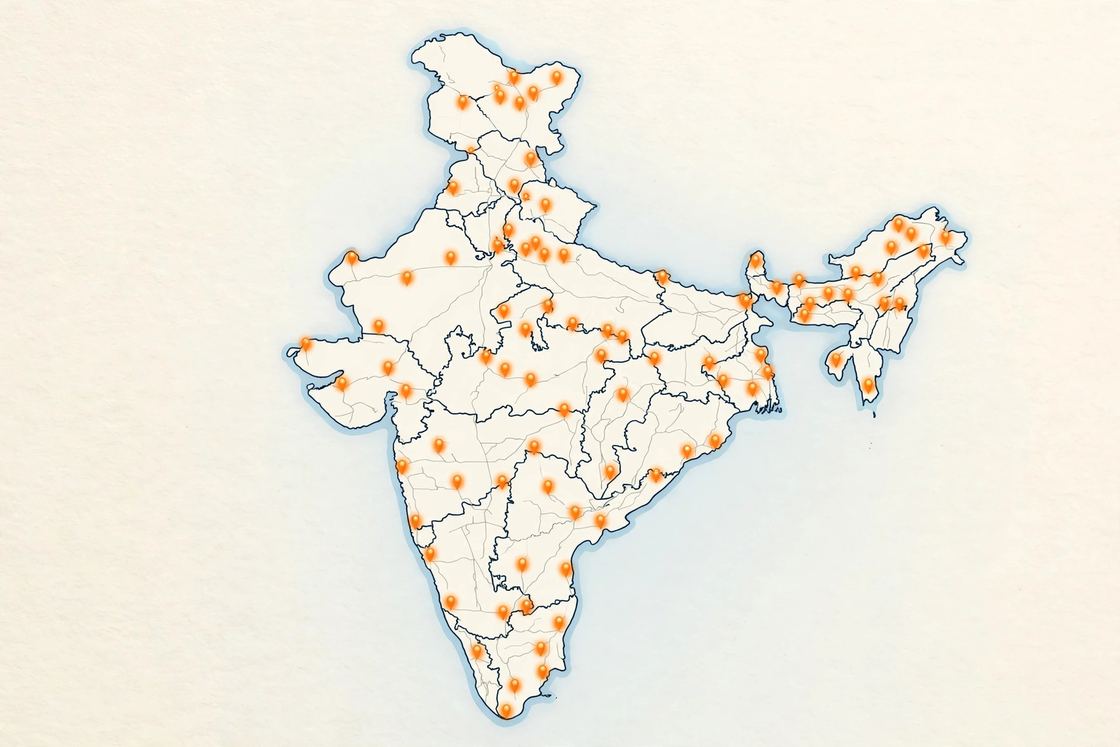
Schema is structured data on the page that tells Google what the business is and where it serves. We call our setup multi-pin architecture: one business, twenty pins on the map, each backed by a real page. The core is a single LocalBusiness block with an areaServed list covering all 20 hubs, plus department entries for hubs with their own pages. Here is the full example, using our real business name, phone and website:
{
  "@context": "https://schema.org",
  "@type": "LocalBusiness",
  "@id": "https://metaprime.online/#organization",
  "name": "MetaPrime Systems",
  "url": "https://metaprime.online/",
  "telephone": "+91-8808588153",
  "email": "contact@metaprime.online",
  "areaServed": [
    { "@type": "City", "name": "Azamgarh" },
    { "@type": "City", "name": "Ballia" },
    { "@type": "City", "name": "Bangalore" },
    { "@type": "City", "name": "Delhi" },
    { "@type": "City", "name": "Deoria" },
    { "@type": "City", "name": "Faridabad" },
    { "@type": "City", "name": "Ghaziabad" },
    { "@type": "City", "name": "Ghazipur" },
    { "@type": "City", "name": "Gorakhpur" },
    { "@type": "City", "name": "Gurugram" },
    { "@type": "City", "name": "Hyderabad" },
    { "@type": "City", "name": "Jaunpur" },
    { "@type": "City", "name": "Kolkata" },
    { "@type": "City", "name": "Lucknow" },
    { "@type": "City", "name": "Mau" },
    { "@type": "City", "name": "Mumbai" },
    { "@type": "City", "name": "Noida" },
    { "@type": "City", "name": "Prayagraj" },
    { "@type": "City", "name": "Pune" },
    { "@type": "City", "name": "Varanasi" }
  ],
  "department": [
    {
      "@type": "LocalBusiness",
      "name": "MetaPrime Systems — Gorakhpur",
      "url": "https://metaprime.online/website-developer-gorakhpur",
      "areaServed": { "@type": "City", "name": "Gorakhpur" }
    },
    {
      "@type": "LocalBusiness",
      "name": "MetaPrime Systems — Varanasi",
      "url": "https://metaprime.online/website-developer-varanasi",
      "areaServed": { "@type": "City", "name": "Varanasi" }
    },
    {
      "@type": "LocalBusiness",
      "name": "MetaPrime Systems — Ballia",
      "url": "https://metaprime.online/website-developer-ballia",
      "areaServed": { "@type": "City", "name": "Ballia" }
    }
  ]
}
Three things about this example are deliberate. First, every city in areaServed has a real page behind it. Second, the department entries are only a sample of three hubs, shown to demonstrate the pattern; the areaServed list already covers all of them. Third, there is no street address, no geo-coordinate and no opening-hours block here — those must be real facts about a physical office. This is a pattern to copy, not our own live schema — take the structure and leave out anything you cannot verify.
How to validate it — and what to do when it errors
Never publish schema without validating it. Paste the page URL into Google's Rich Results Test, or the code into the Schema.org validator, and read the result before the page goes live. A missing comma breaks the whole block — check the last item in every list. A wrong type, like a plain string where the validator expects a City object, gets flagged with the exact line. A URL that does not exist — a department entry pointing at a hub page you have not built yet — is the most common real-world error: build the page first, or remove the entry until you do. After the page is live, check Search Console's enhancements report and fix the one error it names first.
What not to do
Do not buy bulk citations, do not stuff the business name with keywords, and do not publish twenty thin city pages. All three are named in Google's spam policies. Do not invent an address for a city where you have no office, and do not list a city in areaServed that has no page behind it. The shortcut version of local SEO is a countdown, not a strategy. The honest version is slower and it lasts: real pages, a verified profile, consistent details, and real reviews.
Start with one city — the one you know best. Build its page properly, verify the profile, add the schema, then do the next one. If you want help, read our SEO services, or tell us your city on WhatsApp.